
Register as a Business with Tax ID/EIN. If you
Best for: LLCs, Corporations, and anyone with an EIN. If you don’t have an EIN, please click here.
1. Create Your Business Profile
- Log in to your Twilio Console.
- Navigate to Messaging > Regulatory Compliance > A2P 10DLC Overview.
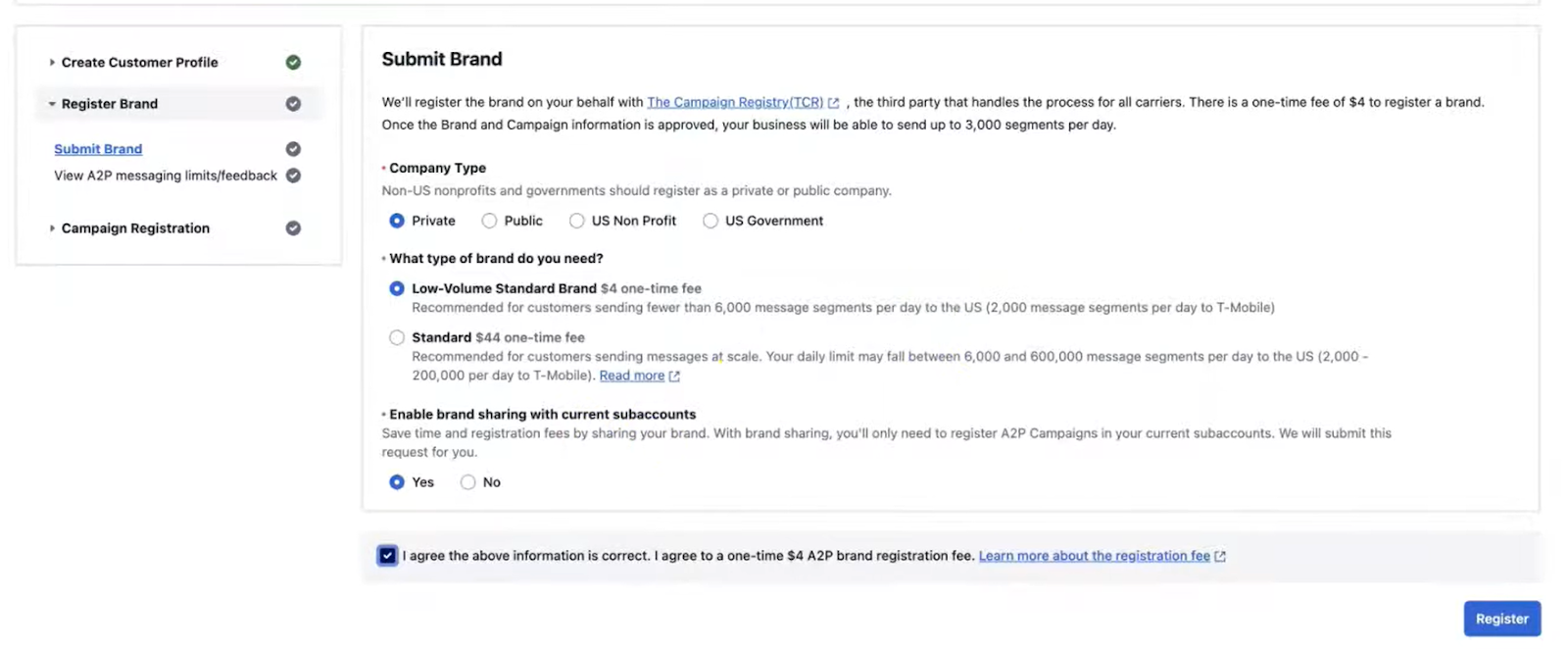
- Register as “Low-Volume Standard Brand”
- Enter your business info exactly as it appears on your IRS tax letter (SS-4 form).
- Legal Name: “Mike’s Lawncare” is not the same as “Mikes Lawncare “. Precision matters.
- EIN: Double-check your 9-digit Tax ID.
- Address: Use the address registered with the IRS. Again, precision matters.
2. Register Your Brand
- Once your profile is submitted, Twilio (and The Campaign Registry) will automatically verify your Tax ID against their database.
- Wait for the status to change to “Verified” or “Approved”. This is usually fast but can take a few hours.
3. Register Your Campaign
- Go to Messaging > Regulatory Compliance > Campaigns.
- Click Register New Campaign.
- Select Your Use Case: Choose the category that fits your texts (e.g., “Low Volume Mixed”).
- Messaging Service: You can select “Create new Messaging Service”
Here is what we used in our demo account. Please feel free to copy and modify based on your own business needs.
Campaign Description:
This campaign sends notifications to our customers, including job notifications, billing and payment reminders, and other important updates regarding their interaction with our business.
Sample Message 1:
Good news! Evergreen Lawn Care is en route to your location to service your trees. We’ll be there shortly! Reply STOP to opt-out.
Sample Message 2:
This is Evergreen Lawn Care. We’re sending you an invoice for the services provided. https://www.yardbook.com/tm/502389422286-1673151775741 Thank you for choosing us! Reply STOP to opt-out.
How do end-users consent to receive messages?
Our end users are customers who have signed up for our services and have requested to receive text notifications for appointment reminders, invoices, payment reminders, and other important updates.
To ensure compliance with privacy and opt-in policies, we have detailed our procedures on our website. You can review our opt-in and privacy policy here:
“https://support.yardbook.com/new-customer-text-message-email-opt-in/“
You can view the Privacy Policy by clicking on the direct link titled “Consumer Privacy Policy” within the support link provided above.
Alternatively, you can experience our opt-in process by going through our online service request process. During the final step of the process, you will find the Consumer Privacy link along with the opt-in checkbox.
For your convenience, here is the link to our service request page:
[Replace this with your unique Get Quote Page link]NOTE: To get your Get Quote URL, please go to Settings -> Get Quote Button
- Submit and wait for vetting (can take a few days).
You can check your 10dlc verification status by following these instructions.
Once you are fully verified, you can link your dedicated number to Yardbook. Please refer to the instructions here.
Please feel free to contact us if you have any questions. ([email protected])